
New Features
1. Sort and filter on the Dashboard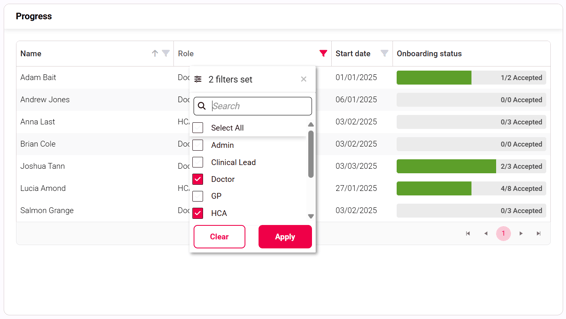
Sort information in columns by A-Z or dates ascending/descending and filter by name, role and start date on the Dashboard screen.
2. Sort and filter on the Candidates List
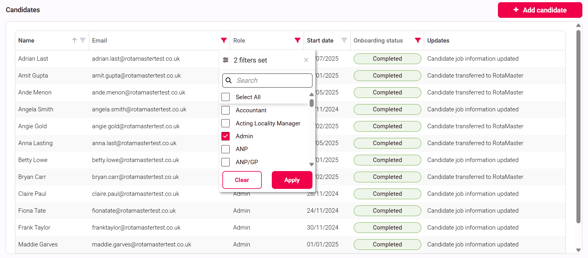
Sort information in columns by A-Z or dates ascending/descending and filter by name, email, role, start date or onboarding status on the Candidates List screen.
3. Sort and filter on Review Documents in a candidate profile
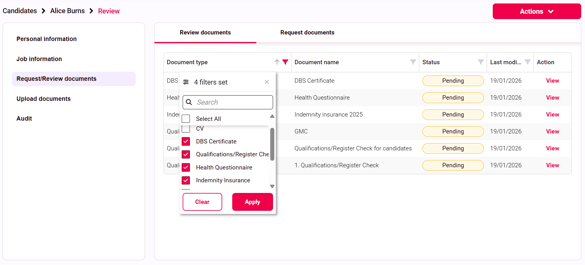
Sort information in columns by A-Z and filter by document type, document name, status or last modified date on the Review documents screen within a candidate profile.
4. Archive templates
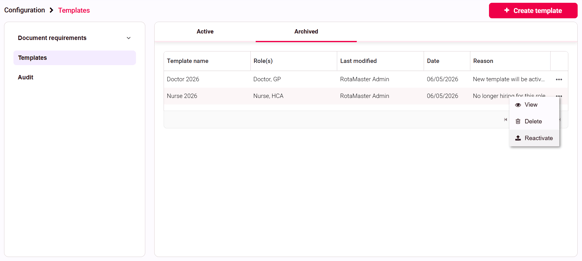
Templates that are no longer required can be archived. To archive a template, click on the 3 dots at the end of the row and select 'Archive', enter a reason and confirm.
Archived templates can be viewed in the 'Archived' tab of the Templates page and can be reactivated by clicking into the template or on the 3 dots at the end of the row and selecting 'Reactivate'.
Other Changes
-
The 'Action' section of the audit can now be expanded to show the full description on a new line instead of a tooltip
-
A clearer error message will show when you try to access a candidate's record that has been deleted
-
When viewing a document requirement against a candidate profile, the document status (e.g. Accepted, Rejected) will show on the detail page
-
You can now see pending documents from candidates in a more detailed view by clicking into them from the Review documents screen
- The 'Edit' button on the Personal and Job Information pages on a candidate profile now displays in a footer at the bottom of the screen so you can start editing from wherever you are on the page
-
On the Request Documents page of a candidate profile, the 'Request' button now displays in a footer at the bottom of the screen
-
The sidebar is now sticky on each page so all options can be accessed when the page content is scrolled
-
Page titles and breadcrumbs are now sticky at the top of the page so they're always visible when the page content is scrolled
Bug Fixes
-
Following a URL link will direct you straight to the desired page instead of the dashboard