![Rota Master - Main Logo - White Text.png]](https://help.rotamaster.co.uk/hs-fs/hubfs/Rota%20Master%20-%20Main%20Logo%20-%20White%20Text.png?height=40&name=Rota%20Master%20-%20Main%20Logo%20-%20White%20Text.png)
⚠️Please note, this release is currently unavailable, your organisation will be informed when it is.
New Features
1. Automatically Pay Breaks by Post
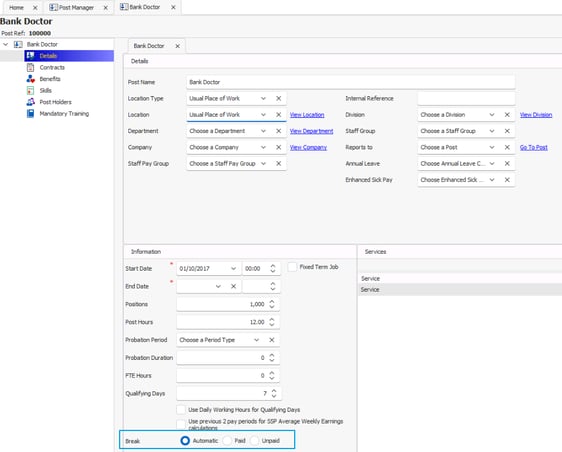
Set breaks to be paid or unpaid at a Post level so that you don't have to manually change breaks on shifts. To set this, go to Personnel > Post Manager > Post > Post Details > Information > Breaks and set this to either paid or unpaid. Then, when a staff member is assigned to a shift, the paid break status will then update based on this setting. Breaks on adjustments will also reflect this setting.
This setting can also be updated on an individual basis in the Post Details > Information section of a Personnel Record.
Other Changes
-
When there are multiple contracts on a Post, the start date of the contract can now be changed. Existing unlocked shifts will be updated to match the new contract
-
When copying a shift in View Rota and Rota Weekly Viewer, there's now an option to mark the copied shift as 'contracted'
Bug Fixes
-
When a person's salary has changed mid month, it now displays the correct figure in the payroll summary view and in the payroll export: Sage Payroll Export exc. Weekly Hours
-
People+ - When an overtime request is approved as TOIL and the times are amended, the person's TOIL allowance is now updated with the correct figure
-
Staff Hub, People+ - In the Overtime section, the text within the Approved section now states 'approved' instead of 'active'
-
Staff Hub, People+ - When a person has multiple Posts, the 'Add Claim' button loads without issue when attempting to submit an Overtime claim
-
Staff Hub - If someone cancels their approved leave, the leave no longer counts towards the maximum number of people on leave on the same day rule
- Staff Hub, People+ - A remaining leave allowance no longer displays against historic Posts
- People+ - Leave allowances are no longer generated for historic Posts
-
When running the Availability Allocation Wizard, the daily rest rule break checks against other shifts in the proposed allocation
-
Quick Add and Quick Replace now adds staff members to shifts as expected
-
When creating an adjustment, the pop up asking if you want to recalculate the adjustment to match daily working hours now displays
-
When an adjustment is created for someone with no daily working hours by removing them from a shift, the break is no longer deducted from the adjustment duration when editing the adjustment
-
Changing an adjustment end time updates the duration and revalues the adjustment when a person has Daily Working Hours recorded
- When approving a leave cancellation and assigning the person back to their original shift, they are now also assigned to the shift adjustments on the shift
- When repricing shifts using Rota Reprice, session fee and registrar fee are included in the total value of the shift
-
When using Rota Reprice and selecting to reprice shift adjustments, these are now repriced successfully
-
When using Rota Reprice, specific zone rates are now taken into account when revaluing shifts based on personal rate
-
When using Rota Reprice and selecting to revalue shifts based on personal rate, if the staff member doesn't have a Pay Rate Pattern assigned, they are revalued based on the Pay Rate Group of the shift
- When updating the 'days before fit note is required' default setting, existing current and future sickness records are now updated
-
SSP - Average Weekly Earnings are now calculated up to midnight of the sickness adjustment, not the specific time
-
SSP - When a staff member has the setting on to use the previous 2 pay periods to calculate SSP average weekly earnings, this now calculates correctly
-
When editing the Pay Rate Group on a shift where the confirmed person has a 0 hours contract and another with contracted hours, a warning to say that Annual Leave allowance will be recalculated now only displays if the contract on the shift is 0 hours