
New Functionality
1. Two week rota view
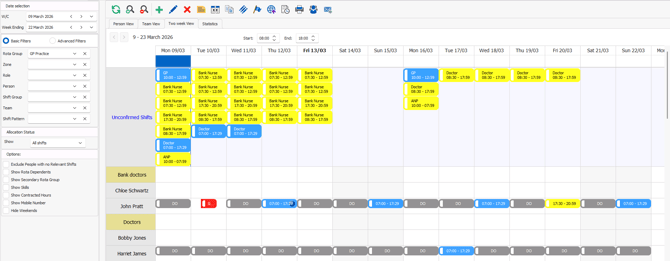
- In Rota>Rota Weekly Viewer there is a new tab called "Two week rota" showing all the rota over the selected two week period
- All unconfirmed shifts will show at the top of the rota with the shift cards showing the following information:
- Role
- Start time
- End time
- Allocated shifts will show in the allocated person's row with the shift card showing the start and end times only
- The shift cards will be colour coded based on Duty Station (set up in Rota>Rota Settings>Duty Stations>Edit Duty Station)
2. People+ - Statutory Sick Pay Calculations
- Contributions will now show on qualifying sickness adjustments on the system
- SSP will be calculated using the daily, or hourly SSP rate depending on the staff member's leave units or contracted hours
- Daily rates calculation pre-06/04/2026: (Qualifying days/weekly SSP rate)
- Daily rates calculation post-06/04/2026: (Qualifying days/weekly SSP rate) or (Qualifying days/80% of average weekly earnings) which ever is lower
-
- Hourly rates calculation pre-06/04/2026: (Contracted hours/weekly SSP rate)
- Hourly rates calculation post-06/04/2026: (Contracted hours/weekly SSP rate) or (Contracted hours/80% of average weekly earnings) which ever is lower
- Sickness adjustments dated pre-06/04/2026 will adhere to the 3 day waiting day and lower earnings limits legislation with sickness adjustment dated 06/04/2026 or later will not consider waiting days of the lower earnings limit
💡Want to know more about how SSP will work on RotaMaster take a look at these guides
Changes
- The following new columns have been added to report [868]: Mandatory Training Requirements:
- Repeated
- Date Completed
- Days until Expiry
- Payroll ID
- The "24 hours rest in a rolling 7 day period" will now look for a 24 hour break not 35 hours
Bug fixes
- The "Maximum number of shift bookings in an 'X' period" Team setting is now working as expected
- People+ - It is no longer possible to remove a staff member from a Post in Personnel>Post Manager>Post Holders when the Post is assigned to active shifts
- People+ - Home to work miles now show as expected on mileage claims
- MFA - When logging in to the mobile app when only one profile is assigned users will be asked to enter an MFA Code
- Single Sign On - Administrators who have registered for Enterprise Login on member Staff Hub on before Admin Staff Hub will now be able to successfully register for Enterprise Login
- Finance+ - The payroll export "Payroll Export per Hourly Rate with Adjustment description" will now show the pay rate reference for adjustments with a negative value
- Availability collection date ranges now successfully upload for new Rota Groups
- Adjustments using the system default adjustment reason of "Day off" can no longer be created on RotaMaster Core systems